Most customers won’t download another app just to carry your loyalty card. But nearly all of them already have a digital wallet on their phone. Mobile wallet marketing puts your loyalty cards, offers and tickets right there, next to their payment cards. That makes them easy to find at the moment of purchase.
This guide explains how wallet passes work, which types brands use most and how passes can update and remind customers over time. It also covers how to get customers to add passes and what to measure once they do.
What is a Wallet Pass?
A wallet pass is a digital card that lives in a phone’s built-in wallet app, such as Apple Wallet or Google Wallet. Customers add it with one tap, without installing an app. Brands can update passes with new balances, tiers or offers, and some updates can alert the customer on their lock screen.
How Mobile Wallet Marketing Works
Every wallet pass follows the same basic lifecycle. Understanding it helps you plan where each part of your campaign fits.
1. Create
Design the pass and its fields
2. Add
Customer saves it with one tap
3. Carry
It sits in their phone’s wallet
4. Update
Balances and offers refresh
5. Use
Scanned at checkout or entry
The five stages of a wallet pass.
The key difference from a plastic card is stage four. A pass can change after the customer saves it. That’s what turns a static card into a marketing channel. It works best when connected to a cross-channel engagement platform that updates it alongside email, SMS and app messages.
Types of Wallet Passes Brands Use
Both major wallet platforms support several pass types. These are the ones most useful for marketing.
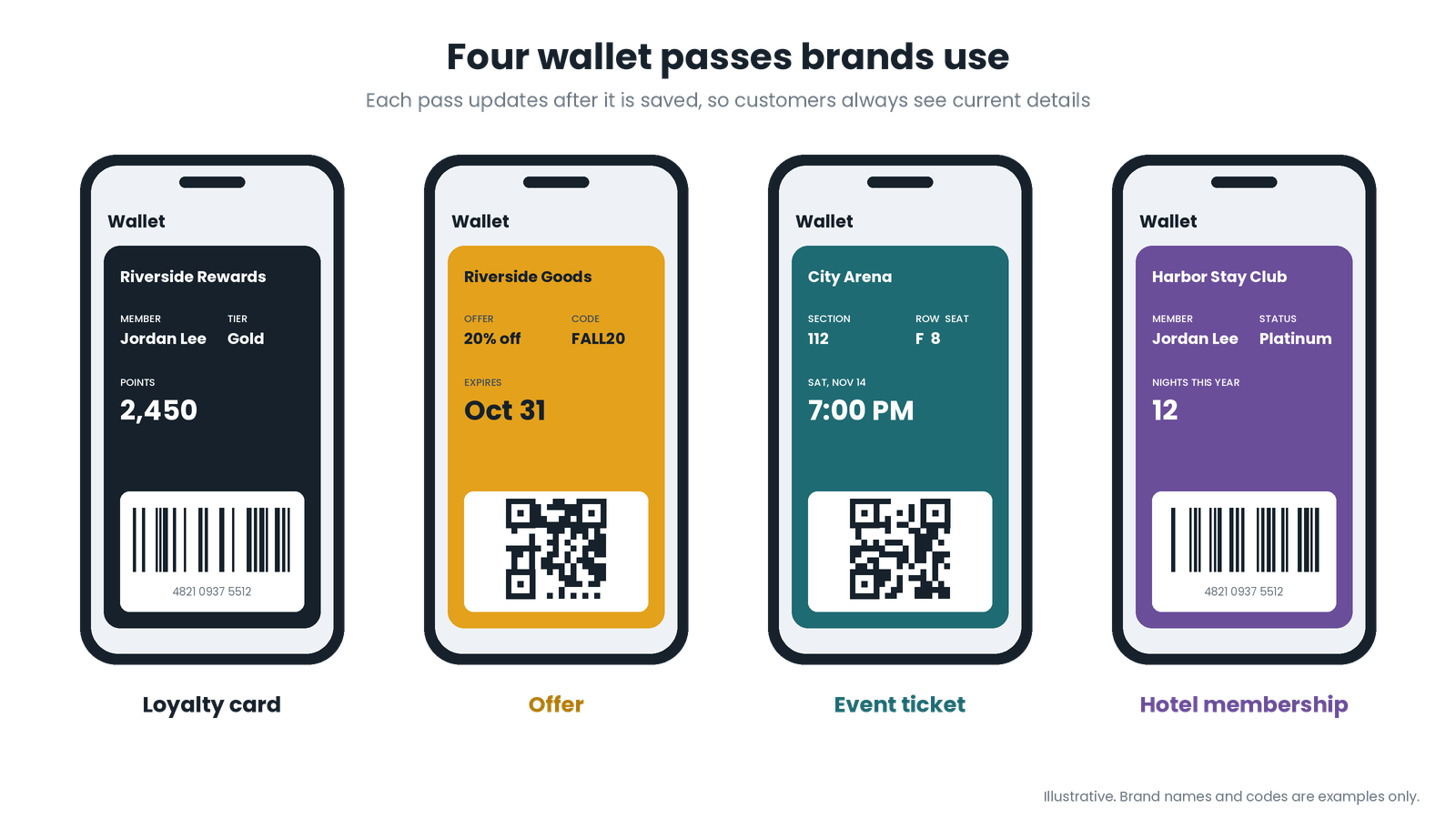
Pass type What it holds Common use Loyalty card Member ID, points balance, tier Scanning at checkout to earn and redeem Offer or coupon A discount or reward and its expiry date Redeeming a promotion in store or online Gift card Card number and remaining balance Paying with stored value Event ticket Seat, date, venue and entry code Entry to games, concerts and events Membership card Member details and benefits Gyms, clubs, museums and associations Mobile Wallet Marketing Use Cases
Loyalty cards with a live balance
A loyalty card in the wallet shows members their points and tier every time they open it. When a purchase earns points, the balance updates automatically. A loyalty rewards platform can issue these passes at sign-up and keep them in sync with every store and online purchase.
Offers that are easy to redeem
Offers saved to a wallet don’t get lost in an inbox. Customers can show them at checkout with a scan. Brands can also set an expiry date or replace an offer with a new one.
Tickets and membership cards
Event tickets and membership cards in the wallet speed up entry and cut down on printed cards. They can also carry updates, such as a gate change or a new member benefit.
Hotel and hospitality programs
Hotels and restaurants can give guests a member card that shows their status and upcoming benefits. Hotel loyalty software can update the pass after each stay or visit, so guests always see where they stand.
Updates and Notifications: Where Wallet Passes Get Powerful
A pass that never changes is just a digital version of a plastic card. The marketing value comes from updates.
Live data. Points balances, tiers, offers and expiry dates can change after the pass is saved.
Update alerts. Google’s Wallet release notes describe lock screen notifications that appear when certain pass fields change. A points balance or a new tier are examples.
Nearby reminders. Google Wallet also supports location-based notifications that customers can turn on. These alert them to a pass when they arrive at a merchant location.
Features differ between wallet platforms and change over time. Check each platform’s current developer documentation before planning a campaign around a specific feature.
How to Get Customers to Add Your Pass
Mobile wallet marketing only works once the pass is saved. Make adding it quick and obvious.
- Offer it at sign-up. Show an “add to wallet” button right after someone joins your program.
- Include it in messages. Add the button to welcome emails and text messages.
- Use QR codes in person. A code at checkout or on a sign lets customers save the pass on the spot.
- Explain the benefit. Tell customers what they gain, such as “See your points anytime, no app needed.”
- Reward the first scan. A small bonus the first time a pass is used encourages customers to keep it.
Best Practices for Wallet Passes
Do
- Keep the front of the pass clean and readable
- Show the details customers check most, such as points
- Send updates only when something meaningful changes
Avoid
- Sending frequent alerts that feel like spam
- Letting balances fall out of sync with your records
- Using the pass as a substitute for an actual reward
Keeping passes accurate is far easier when every system reads from one loyalty record. Our 2025 post on loyalty programs built on APIs shows how that works in practice.
How to Measure Mobile Wallet Marketing
Passes added: how many customers saved your pass, and from which touchpoint.
Active passes: passes still saved after 30, 60 and 90 days.
Removals: a spike after an update can mean alerts feel intrusive.
Scans at checkout: how often the pass is actually used.
Offer redemptions: how many wallet offers turn into sales.
Putting Mobile Wallet Marketing to Work
Mobile wallet marketing gives your brand a place on the one screen customers always carry, without asking them to install anything. Start with a loyalty card or offer, make adding it effortless and keep it updated with information customers care about. Then the pass stops being a card and becomes a channel.
Plan wallet passes that customers keep
Thinking about wallet passes for your loyalty program, offers or events? Tell us about your customers and where they shop. Our team will help you plan passes, updates and add-to-wallet touchpoints that fit your program.